
BUYER'S GUIDE FOR PATENT TEAMS
Patent Drafting Software: How to Choose the Right Tool
“Patent drafting software” now covers everything from Word proofreading add-ins to AI platforms that produce a full first draft. This guide explains the categories, the questions that separate them, and how to test a tool on your own matters before you commit.
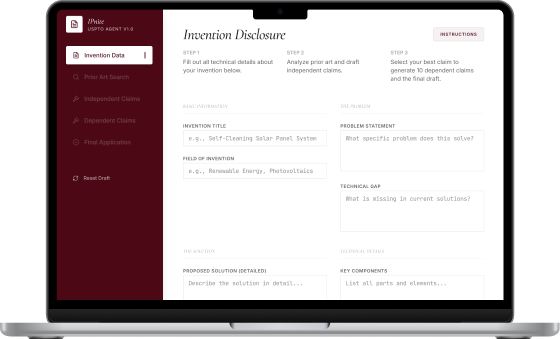
The four kinds of patent drafting software
Most products fall into one of these groups, and many teams end up combining two of them. Knowing which group a product belongs to tells you what to expect from a trial.
Proofreading and automation add-ins
Run inside Microsoft Word. They check antecedent basis, claim numbering, reference numerals, and support in the specification, and they fill forms and shells. They make an attorney's own draft cleaner; they do not write it.
Generative drafting assistants
Produce claims and specification text from an invention disclosure or from claims you supply. Useful for first drafts and repetitive sections; output quality depends heavily on the disclosure and on review.
Search and analytics suites with drafting modules
Large patent databases and landscape tools that have added AI drafting or office-action features. Strong on data coverage; usually priced and sold to larger organizations.
End-to-end workflow platforms
Keep disclosure, prior-art search, claims, specification, drawings, and filing records in one project, so each step uses the context of the previous one. The trade-off is adopting a new workspace instead of staying only in Word.
Match the tool to your bottleneck
The right category depends less on features and more on where your drafting time actually goes.
| If most time goes to… | Prioritize | Less important |
|---|---|---|
| Cleaning up drafts and catching errors before filing | Word-based proofreading, antecedent-basis and numeral checks | Generative drafting |
| Writing first drafts from inventor disclosures | Disclosure intake, claim generation, specification drafting, editable DOCX export | Large analytics dashboards |
| Deciding whether to file at all | Prior-art search connected to the draft, patentability reports | Office-action tools |
| Keeping many inventions and deadlines organized | Portfolio records, deadlines, permissions, collaborators | Advanced text generation |
| Answering examiner rejections | Office-action analysis and response drafting | Disclosure intake |
Questions to ask every vendor
Ask for written answers. Where a vendor says something is “coming soon,” evaluate the product that exists today.
- Is my content used to train or improve any model, including the vendor's model providers? Where is that stated in the contract?
- Which AI provider processes my data, in which region, and what does that provider retain and for how long?
- Can I export an editable DOCX that my team can finish in its normal templates?
- Does the tool keep claims, description, and drawing reference numerals consistent with each other?
- Can prior-art references be saved inside the same matter the draft is written in?
- Which patent offices and application types does the drafting workflow support?
- How are collaborators, permissions, and client separation handled?
- What does the price include (projects, searches, users, storage), and what counts as an add-on?
- Is there a trial that allows a realistic test with a non-confidential or already-published disclosure?
- Who is responsible for the final text? Look for vendors that are explicit that review stays with the practitioner.
How to run a fair pilot in two weeks
Demos use the vendor's best examples. A pilot on your own matters tells you far more.
Pick two or three published matters
Use applications that are already public, so no confidential material is at risk and you have a finished version to compare against.
Start from the original disclosure
Give each tool the same inventor disclosure your team started from, not the filed application.
Measure edit time, not generation time
Record how long a practitioner needs to bring each draft to a fileable standard. Fast generation that needs heavy rewriting saves nothing.
Review the claims first
Check scope against the closest prior art, support in the description, antecedent basis, and whether dependent claims give meaningful fallback positions.
Check the paperwork around the draft
Export formats, version history, collaborator access, and the data-processing terms you would sign.
Decide on evidence
Compare total time and review effort per matter against the subscription cost for the number of seats you actually need.
Where IPnite fits
IPnite is an end-to-end workflow platform. One project holds the invention disclosure, prior-art search, claims and specification drafted by The Drafter, patent drawings, QA checks, DOCX export, and portfolio records. It supports preparation for the USPTO, Mexico's IMPI, INPI Argentina, INPI Brazil, and PCT applications, in English, Spanish, and Portuguese.
It is a strong fit when first drafts, examiner responses, and switching between separate tools are the bottleneck, and it is built for Latin American practice, with local prices for Mexico, Argentina, Brazil, and the rest of the region. Teams that only need Word proofreading of drafts they already write themselves may be better served by an add-in.
- Public pricing and a 7-day free trial without a credit card
- Editable DOCX export on every plan
- Collaborators and team permissions for firms and institutions
- A dedicated email to receive patent office notifications and answer the examiner from IPnite
- Direct filing from the app in some offices, such as INPI Argentina
- Customer content is not used to train AI models
Software drafts; practitioners decide
No drafting tool, IPnite included, can judge claim strategy, business priorities, or the legal risk of a filing. Treat any generated text as a draft that a qualified person reviews before it is filed.
Frequently asked questions
What is patent drafting software?
Software that helps prepare patent applications. It ranges from Word add-ins that proofread and automate forms to AI tools that generate claims and specifications, and platforms that connect drafting with prior-art search, drawings, and portfolio records.
Is AI patent drafting software accurate enough for real filings?
It can produce useful first drafts, but accuracy depends on the quality of the disclosure and on review. Practitioners should check claim scope, written-description support, and consistency before anything is filed.
Should a firm replace its Word add-ins with an AI platform?
Not necessarily. Proofreading add-ins and generative platforms solve different problems. Many teams draft in a platform, export to DOCX, and still run their usual checks in Word.
How much does patent drafting software cost?
Pricing varies widely. Some vendors publish monthly plans, some charge per application, and many enterprise tools only quote on request. Compare what each plan includes, such as users, projects, and searches, not just the headline price.
Pilot IPnite on a real disclosure
Explore a Search Strategy Preview or Draft Preview with your own invention. The 7-day free trial does not include a complete search or a final refined, exportable application. No credit card and no automatic charges.
Try IPnite free